A Myan Yout
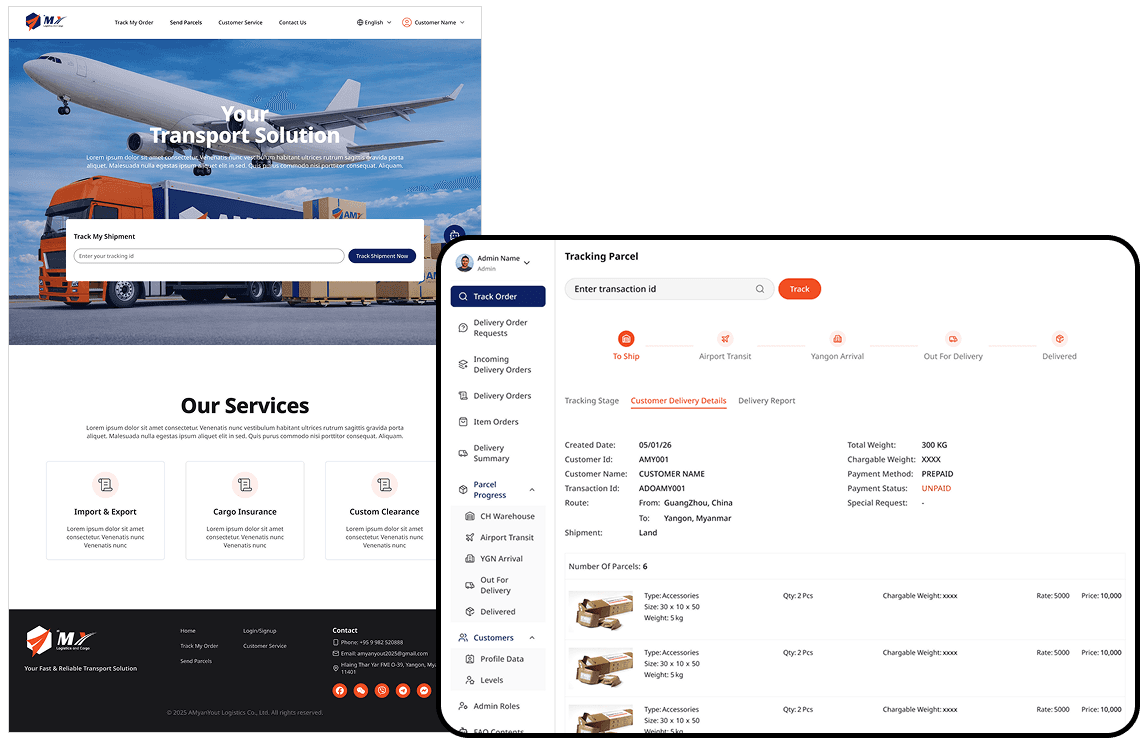
A logistics platform built to replace paperwork, phone calls, and scattered spreadsheets with a centralized real-time operational system for parcel tracking, pricing, and delivery coordination.
Stakeholder
A Myan Yout (China-Myanmar Cargo Supplier)
Role
UX/UI Designer
Services
Stakeholder Consultation, UX Strategy, UI Design
Team
2 Developers
Tools
Figma, FigJam
Timeline
4 months, 2026
/ Context
As customer demand grows, manual paperwork and communication become bottlenecks to efficient operations.
The team was running a real business through whatever tools were available.
Customers called to ask for prices.
Parcel tracking lived in spreadsheets that someone updated by hand.
Customer details were written on paper.
When a delivery went wrong, drivers tried to remember what happened.
THE PROBLEM
Customers were calling for updates. Drivers were relying on memory. The office staff was busy with paper. The challenge wasn't just digitizing. It needed one system that worked for all three at once.
How might we replace every manual workaround with one connected platform, built for all three users without making any of them feel like an afterthought?
/ Understanding the exiting operations
6 key issues are observed while mapping the existing workflow.
Before jumping into solutions, I mapped the current workflows with stakeholders to understand where the real friction lived: how pricing was communicated, how parcels moved through stages, how drivers logged deliveries, and where information got lost between roles.
Issue 1
Customer calls staff to ask for a price quote and parcel tracking.
Issue 2
Drivers scroll long lists to find the right parcel and update status by hand.
Issue 3
Parcel stages updated manually in Excel, entries missed or mislabeled.
Issue 4
Delivery disputes investigated from memory, no proof, no record.
Issue 5
Customer records stored on paper, retrieval took minutes.
Issue 6
Customer contacts ran across multiple messaging platforms.
/ Understanding The Users
3 types of users and how the system is related to each other.
A customer checking their shipment on a laptop has completely different needs from a driver confirming payment on their phone at someone's front door. And both are different from office staff managing hundreds of parcels from a desktop.
Customers
Sending parcels from China to Yangon
Needsto get a price estimate.
Place an order.
Track their shipment without calling anyone.
Website
Self-service
Drivers
Completing deliveries in the field
Need to find the right parcel fast.
Know the payment type before arriving.
Log proof of delivery on the spot.
Mobile Web
Field Use
Operation Staffs
Managing the system from warehouse to delivery
Need to track every parcel across five stages.
Manage pricing.
Handle customer records.
Monitor the operation.
Operation
Dashboard
/ Designing the Solutions
Digitizing the workflow and improving faster processing for 3 user types.
Issue 1 Solution
Self-serve pricing inquiry with two parcel type tabs.
Issue 2 Solution
Barcode scan triggers instant status update, no searching required.
Issue 3 Solution
Five-stage delivery data pipeline with role-based automatic updates.
Issue 4 Solution
Proof of delivery: photo, driver name, attempt number, stored per customer.
Issue 5 & 6 Solution
Searchable digital database: centralized, secure, retrievable in seconds.
Customer experience from phone calls to self-serve
/ Solution for manual Communication of fee inquiry
A self-service price inquiry and no more calling is needed just to get a price.
Customers fill in parcel details on the website and pricing is calculated. There is no need to call the staff manually.
Shipment details for where the parcel is going to send

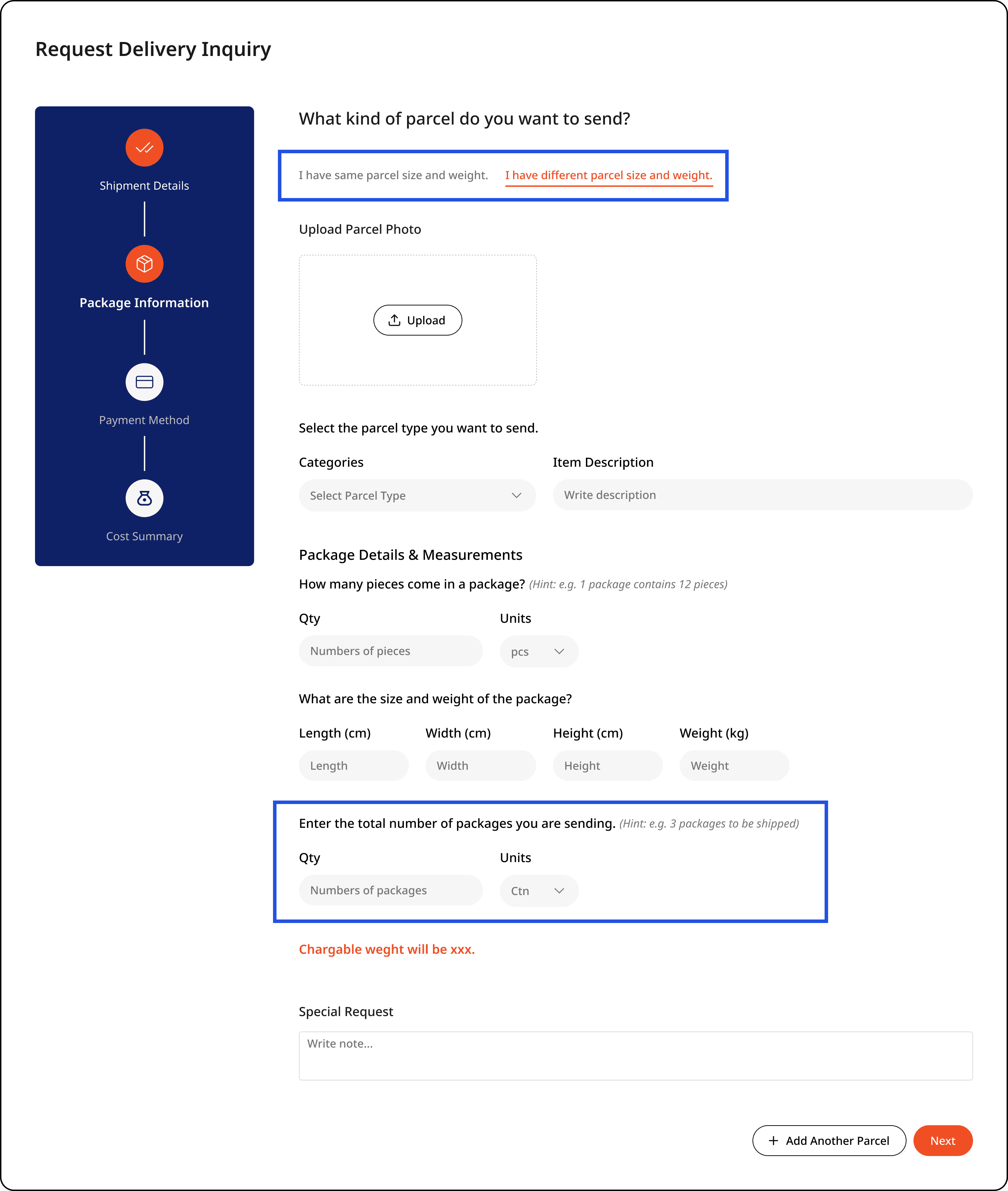
Select parcel types for sending package
Parcels come in all shapes so separated the flow into two tabs: same size/weight, and different sizes/weights.
Rather than forcing customers to create a new entry for every parcel, a simple quantity control lets them adjust the count in one place.
Payment method to proceed


Estimated cost for parcel price inquiry
Parcels don't always match what customers describe. "Estimated" sets the right expectation upfront and the final cost may adjust once the parcel is measured on the ground.

The two buttons reflect real customer decisions, not system actions.
"I am ok with the price and want to send my parcels": confirm and proceed with pickup, or
"I will send later": save the details for later.
/ Price Inquiry History
Customers can review every price inquiry they've submitted and check the current status of any active delivery without contacting anyone.

/ solutions for manual Phone call order tracking
Enter the order number and see the full journey of delivery.
Before this system existed, tracking a parcel meant calling staff and hoping someone could find the record. Now customers enter an order number and see the full journey, including which driver handled pickup and delivery.
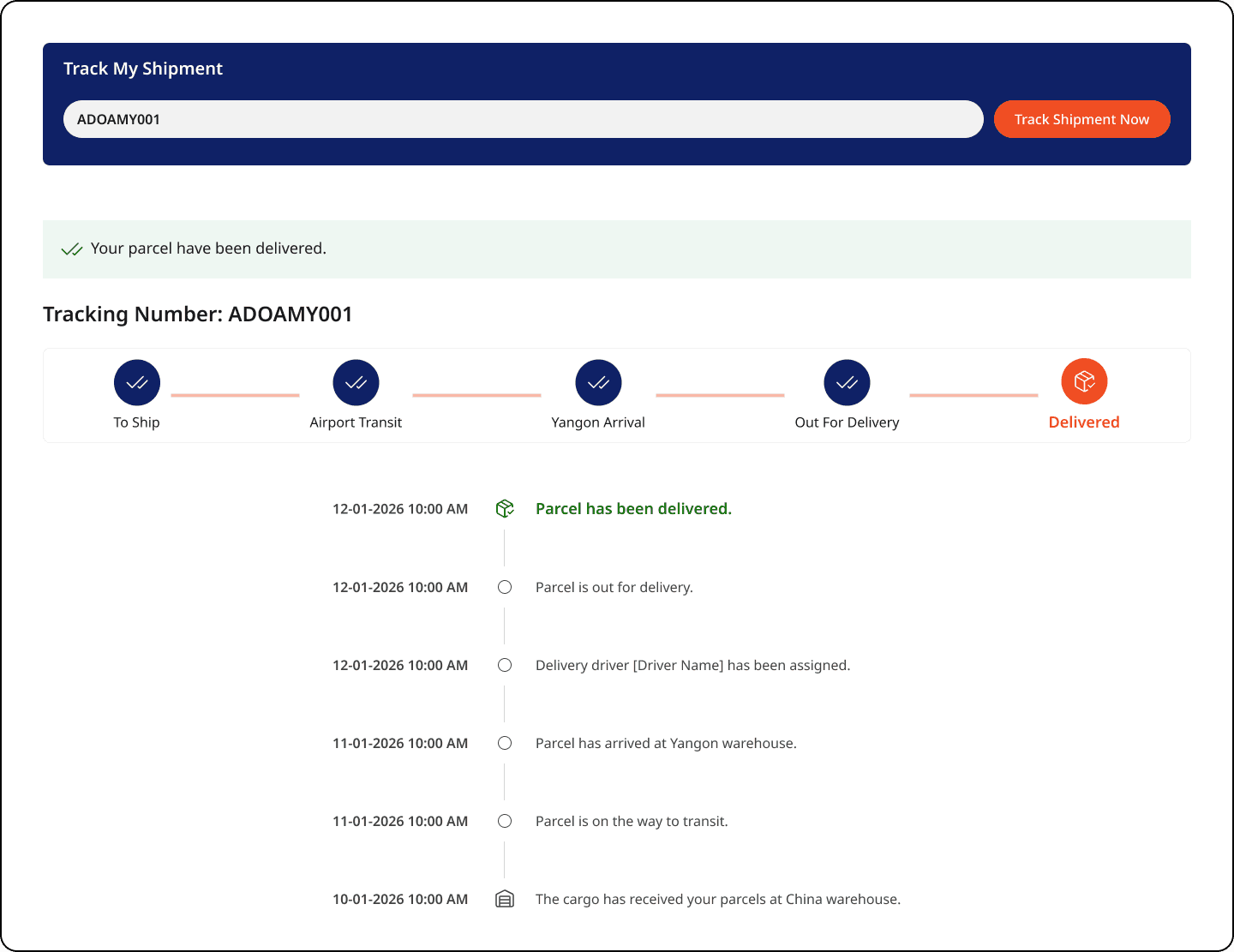
Additon of driver name changed dispute resolution.
Adding a driver name to the tracking view wasn't a UI preference. It was a direct response to a real operational problem.
Lost parcel complaints took hours to investigate because no one could confirm who handled the delivery.
Driver experience: designed for the field, not the office
/ solutions for Duplicate parcel taken
One barcode scan resolves a long scroll.
Drivers were updating parcel statuses by scrolling through long lists to find the right customer, which caused slow, error-prone, and frustrating when they're working fast in the field. Barcode scanning helps one scan, instant update, and no searching required.
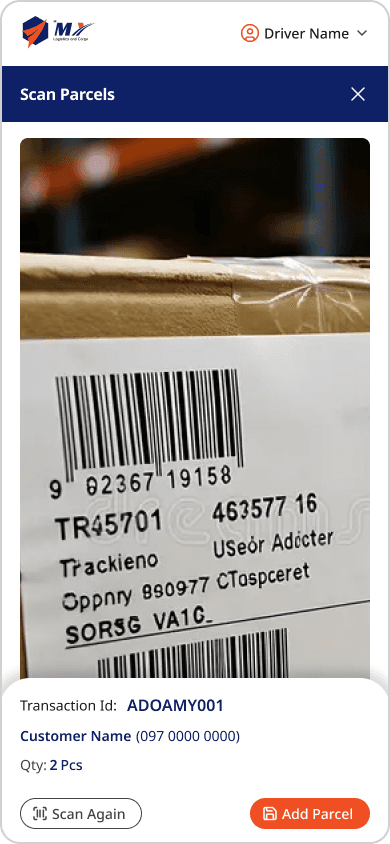
Phone-first, no app install needed.
Since a native app was planned for a later phase, I designed the driver surface as a mobile-optimized web interface.
Drivers got a full phone-first experience from day one and no install required.
4 delivery states are color-coded so drivers can scan the list at a glance and immediately spot what the delivery means.
Completed deliveries are highlighted in green.
Payment status is color-coded: green for prepaid, red for cash on delivery.


In Progress Delivery
Payment: Prepaid

Payment: Cash on Delivery

Completed Delivery
Payment: Prepaid

Payment: Cash on Delivery

Proof of delivery are recorded, not recalled from memory.
Drivers log recipient details, pickup type, and payment status while delivering on the ground. For behalf pickups, that record is what makes any dispute resolvable without chasing anyone.
Use color cues to separate payment types.


Operations & Dashboard
/ Simplify internal operations
How to make operation staff to handle all the processes: customer data reterival, parcel transit state, delivery issues within seconds?
/ solutions for Relying on Different Paperwork
Paper records were replaced with a centralized digital database.
Customer information is now secure and retrievable in seconds without being needed to flip through a folder or ask a colleague.
Customer Profile Data

Customer History

/ solutions for Inquiring correct fees
Pricing depends on chargeable weight (a mix of size and actual weight) which is too variable to automate, so manual adjustment are needed.
Customer Delivery Request Inquiry

Manual Price Adjustment

/ solutions for A bunch of Excel Files
Manual Excel updates of delivery data were replaced with a structured five-stage pipeline.
Five stages are: Arrive at China Warehouse → Airport Transit → Arrive at YGN Warehouse → Out for Delivery → Delivered. Each stage updates automatically, removing the chance for entries to be missed or mislabeled.

Check all delivery overview in one place

Using batch cards for multiple airport transit saves time for tracing individual route delivery.
Airport transit handles multiple batches daily. I used batch-based cards so staff can quickly access parcel details without scrolling through a growing list.

Detail parcel transit lists
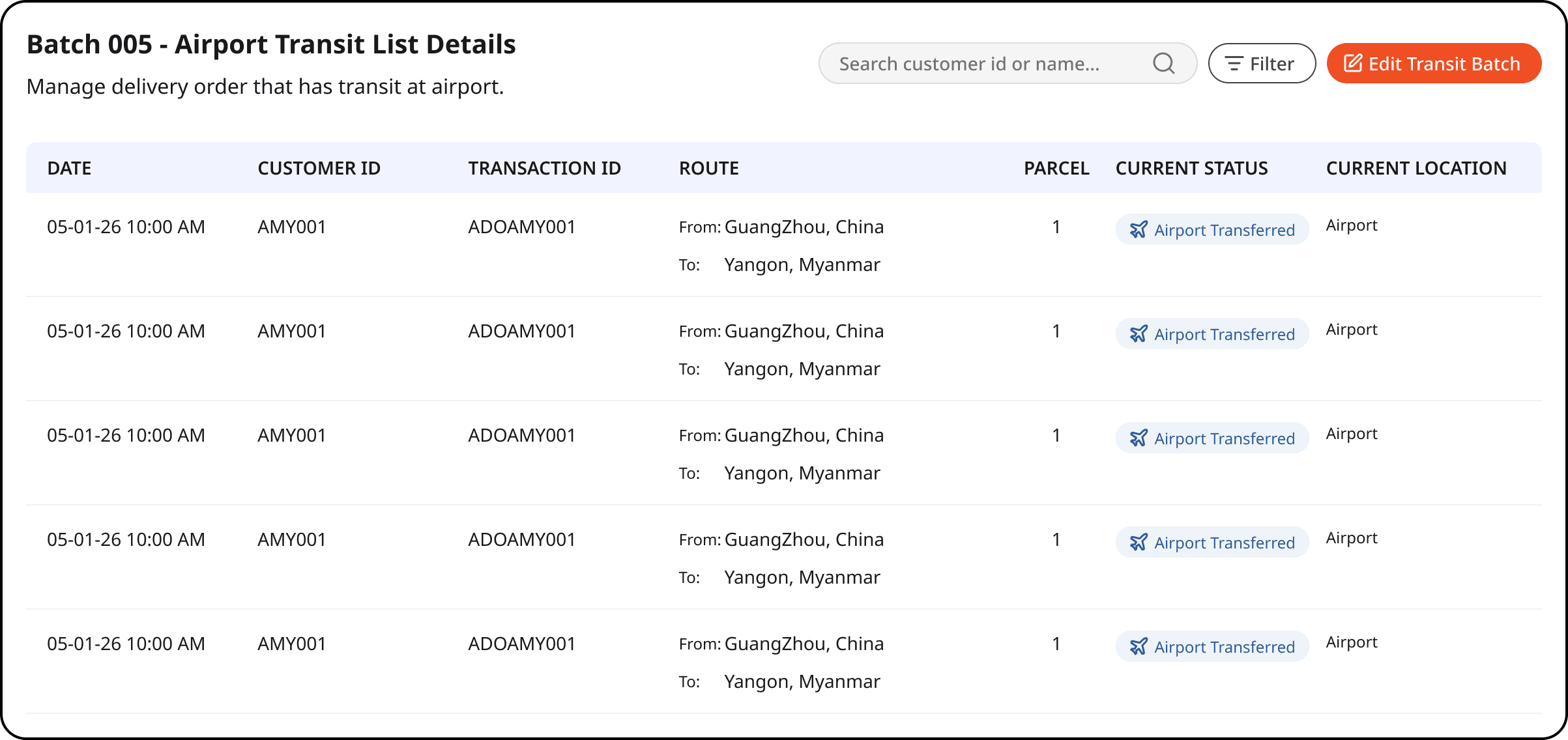
The driver's name acts as a key data for "out for delivery" stage.
The moment a driver scans a parcel, it shifts to "Out for Delivery". Since the transaction ID is already in the system, payment status appears automatically alongside it and driver's name is recorded.

/ solutions for Trace of parcel Receiver
Delivery records are stored per customer, not on driver's phones of random gallery.
At the "Delivered" stage, every delivery photo, recipient detail, payment status, and attempt number is stored per customer, not buried in a driver's phone. Operations staff can investigate any delivery dispute without chasing anyone.
Drivers scan to report delivery status instead of searching, no scrolling through lists in the middle of a delivery run.


Multiple deliveries for one order are tied with Delivery Attempt No.
Some orders take more than one delivery attempt. A Delivery Attempt No. ties each attempt to a transaction ID, showing exactly how many parcels arrived, how many attempts it took, and which driver handled each.

Tracking with ID for fast searching delivery history in admin side


/ What We Couldn't Fully Solve
We tried 4 approaches but still, automated pricing hit a wall that reality built.
Automating fee calculation was the one problem we couldn't crack cleanly. Pricing depends on chargeable weight, a calculation that combines both parcel size and actual weight, and real-world variation made every automated approach fall apart.
Four approaches, four dead ends.
Approach 1
Fixed size-based rates fell apart when actual dimensions didn't match categories.
Approach 2
Customer-input dimensions were unreliable, people guessed, and they guessed wrong.
Approach 3
Tiered pricing (small/medium/large) was too blunt for edge cases.
Approach 4
And simplifying to weight-only or size-only conflicted with how logistics pricing actually works.
For now, manual adjustment by staff is the most reliable path, not ideal but honest.
A staff member adjusting the price manually is still the way it works today.
/ Business Value
Four improvements across team operations
For Customers
Self-serve pricing and tracking
Customers can check prices and track their parcels on their own. No phone call needed on either side.
For Operation Staffs
The whole operation in one view
The team can see what's moving, what's delayed, and what needs attention without asking anyone.
For Operation Staffs
Every delivery, fully documented
Every delivery is logged with a photo, driver name, and payment status. Any complaint can be checked in seconds instead of investigated for hours.
For Operation Staffs
For Drivers
No more manual stage updates
Parcel stages update automatically as staff work through them. Nothing gets missed, nothing gets entered twice.
/ Takeaways
What I've learned
Designing for three different users on three different surfaces forced me to think in systems, not screens. Every decision I made for the customer side had implications for the driver and operations sides. I couldn't get one right without thinking about the others.
What I'd do differently
I tested the driver screens in an office, not in the field. Real drivers are working fast, often outdoors, sometimes with one hand. That context changes what works and what doesn't. Next time, I'd go out with drivers before finalising anything on their side.
What comes next
Pricing is still the unsolved problem. As the business grows, the time staff spend manually adjusting rates will start to slow things down again. The four approaches we tried and ruled out aren't dead ends. They're a documented head start for whoever tackles the pricing engine next.
See Next Project